
A GST billing app for the shops that build India
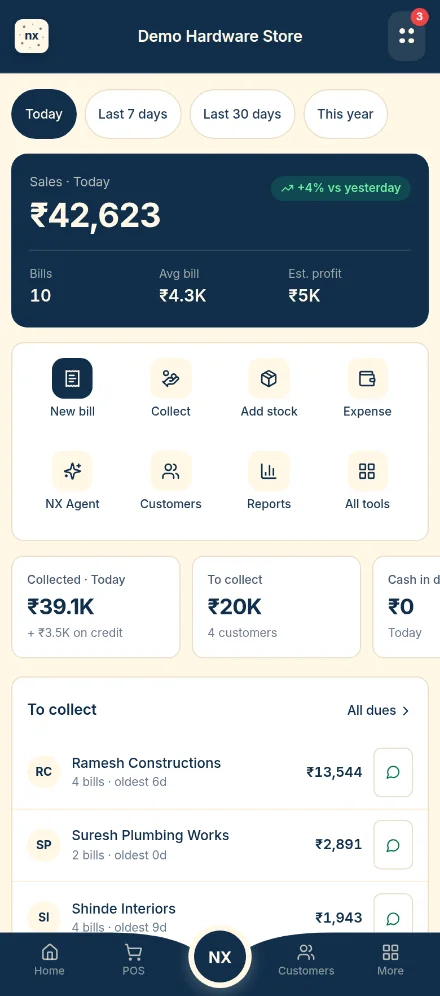
Electrical, plumbing and sanitary, paints, plywood and building-material shops sell thousands of items in many sizes, often on credit. NANDIX makes the GST bill, cuts the stock and records the udhaar in one step.
What each counter needs from a billing app
Electrical shops
Wire by the coil or the metre, switches by the piece or the box, and brand-wise rates. HSN codes per item, so every bill carries the right GST.
Plumbing & sanitary
Pipes and fittings in every size from ½" up. Quotations for a full bathroom that turn into a bill when the plumber confirms.
Paint shops
The same shade in 1, 4, 10 and 20 litre packs, MRP kept separate from your selling price, and painters who pay at month end.
Plywood & interiors
Sheets by grade, thickness and size, laminates by design number, and big orders billed in parts as they are delivered.
Building materials
Cement by the bag, steel by weight, and contractors' udhaar that you can follow by how old it is.
Hardware & tools
Thousands of small items. See our page for hardware shop billing software.
GST billing, in plain words
These are the rules a billing app has to get right. Confirm your own case with your CA.
- Tax invoice vs. bill to a consumer. When you sell to a GST-registered business, the invoice must show their GSTIN so they can claim input tax credit. For unregistered customers the invoice needs no GSTIN, and for sales under ₹200 the law allows one consolidated invoice at the end of the day.
- HSN codes. Shops with turnover up to ₹5 crore show at least a 4-digit HSN code on B2B invoices; above ₹5 crore, 6 digits.
- CGST + SGST or IGST. Selling inside your state splits the tax into CGST and SGST. Selling to another state uses IGST. The place of supply decides which one.
- One invoice series. Invoice numbers run in one continuous series for the financial year, with no gaps or repeats.
- Keep records. GST law asks you to keep invoices for about six years. Your billing app should let you download them.
Our GST invoice format guide has a full field-by-field list.
From bill to stock to udhaar in one step
GST invoices
GSTIN, HSN, CGST/SGST or IGST, thermal and A4 formats, your logo, bank details and UPI QR.
Numbers that never repeat
One series, no duplicates, even when several staff bill at the same time.
Stock with every bill
The counter sees how many are left before adding an item. A bill can't sell stock you don't have.
Udhaar from the bill
Unpaid amounts go to the customer's account, with part payments and dues by age. More on udhaar
Scan supplier bills
Photograph a supplier's invoice to add stock without typing, with a warning if it was already entered.
Staff logins
Each staff member bills under their own login. You decide what they can see and do.
Not yet available: e-invoicing (IRN) and Tally sync. If you need them, tell us when we call.
Want to see NANDIX with your own items? We'll call you.
Leave your number. We call you, show NANDIX on your own items and set it up with you. Nothing is charged.
- Takes 30 seconds: name, mobile and town.
- We call only about NANDIX. No spam, and your number is never sold.
- Want to fill in your shop details yourself? Apply for the pilot.
GST billing FAQ
Which GST billing app is best for an electrical or plumbing shop?
Choose one that handles items in many sizes and units, keeps stock in step with every bill, and records credit from the bill. Our 12-point checklist helps you compare any apps you are considering.
Is the customer's GSTIN required on every bill?
Only when the customer is GST-registered and wants to claim input tax credit (a B2B sale). For walk-in customers, the bill can be issued without a GSTIN.
When do I charge IGST instead of CGST and SGST?
When the place of supply is in a different state from your shop. Sales inside your own state use CGST and SGST.
Can I make GST bills on my phone?
Yes. NANDIX runs in the browser on an Android phone, a tablet or a computer, and prints to thermal or A4 printers.